Table of Contents
Home
/
Blog
/
Excel to a Management Accounting Platform: When You've Outgrown the Spreadsheet and How to Move Without Losing a Single Row

410

5 min

03.07.2026
Excel to a Management Accounting Platform: When You've Outgrown the Spreadsheet and How to Move Without Losing a Single Row

Oleksiy Bazyura
Financial Expert at Finmap
"For three years the spreadsheet was fine. Then I opened it one Tuesday and it took eight minutes to load. That was the day I realised I'd been managing a business with the tool I used in university."
Every founder who runs a small business past ₴3M revenue has the same conversation with themselves once. The spreadsheet has stopped being a helper and started being an obstacle. Formulas break in cells you don't remember touching. The person who set it up two years ago left. You've stopped opening it on Fridays because you already know what it's going to say — which is not the same as knowing what's actually happening in the business.
This article is for the moment right before that migration. When you've realised Excel isn't enough but you don't yet know what to do about it, and the idea of "moving to a platform" sounds like weeks of work and a real chance of losing data.
The founder who ran ₴6M in construction services — five employees, two shops, three years old — described the migration she completed in four weeks without losing a single historical row. This article is her method.
Why This Problem Happens to Every Growing Business
Excel is genuinely the right tool at the start. It's cheap, it's flexible, it does exactly what the founder needs during year one. The problem is that it doesn't scale, and the founder doesn't notice the deterioration because it's gradual.
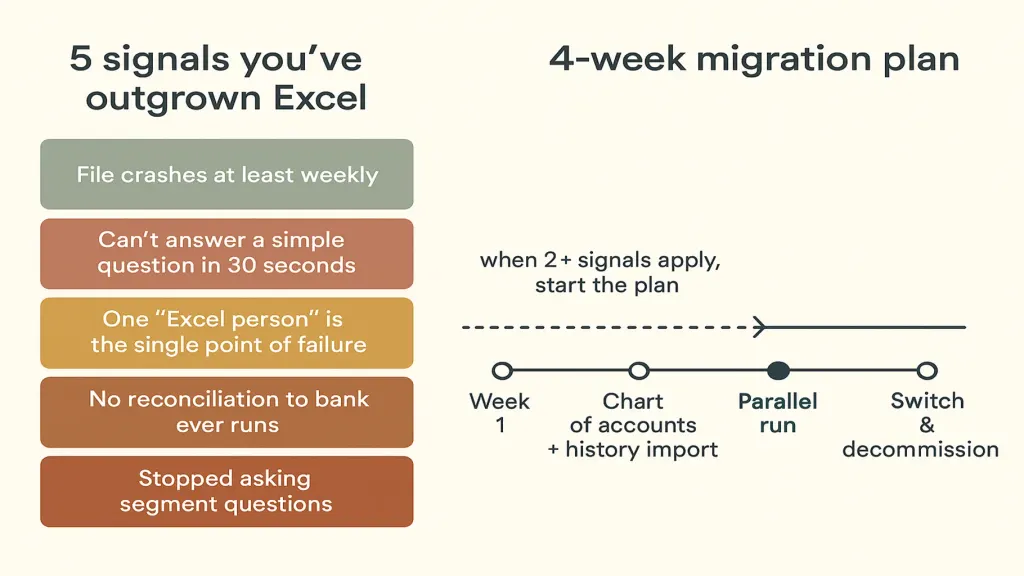
One — the file gets slower every quarter. More rows, more sheets, more cross-references, and Excel starts taking real seconds to open, to filter, to save. The friction compounds.
Two — one person becomes the "Excel person". The bookkeeper, the founder, an admin. When they're on holiday, the business flies blind. When they leave, the spreadsheet becomes a fossil the next person doesn't know how to touch.
Three — cross-verification is impossible. You can't tell whether September's numbers match the bank because Excel doesn't reconcile to accounts. You start believing the spreadsheet without checking, and quiet errors accumulate.
Four — collaboration breaks. Two people opening the same file, one wins, the other's changes vanish. Google Sheets fixes some of this, but the formula complexity of a real management accounting workbook still overwhelms it.
Five — you stop asking questions Excel can't answer. "What's our real margin per project?" — too much work to segment. "Which client is most profitable?" — need to re-cut the whole model. Over time you stop asking, and the questions matter more than the answers.
How to Recognise You've Outgrown It (Four Real Scenarios)
The founder above described four moments when it became obvious:
Scenario one — the file crashed twice in one week. No error message, no recovery. Half a day of work lost each time. She realised she was one bad Tuesday from a serious problem.
Scenario two — she asked a simple question and couldn't answer it. "How much did Client A pay us this year, net of the two refunds?" Twenty-five minutes with the spreadsheet later, she had a guess — not an answer.
Scenario three — the bookkeeper made a change and nobody noticed for six weeks. A currency conversion rate was updated wrong. Everything downstream shifted. Only surfaced when the accountant flagged an anomaly for the tax filing.
Scenario four — she said "все в Excel, забуваю" out loud in a client meeting. The client was a potential investor. He asked how she saw the business. She said the truth. The conversation didn't recover.
If two or more of these have happened to you in the last six months, you've outgrown the spreadsheet. The next section is what to do about it without breaking anything.
How to Solve It — The 4-Week Migration That Doesn't Lose History
The founder's migration took four weeks of part-time work. Framework applies to any small business moving off Excel.
Week 1 — audit and freeze.
Take a full snapshot of the current spreadsheet (name it historical_frozen_YYYY-MM-DD.xlsx) and store it read-only. This becomes your reference source of truth. Then list every calculation and report you actually use — usually 6–10 items. Not what you could do; what you actually look at monthly.
Week 2 — chart of accounts and history import.
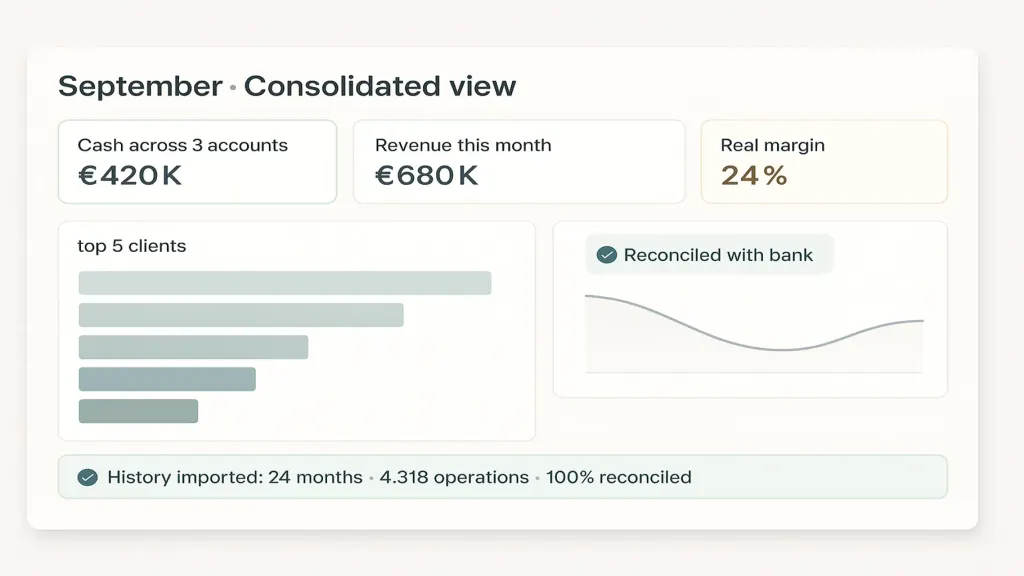
Rebuild the chart of accounts on the platform. Import 24 months of historical transactions (from bank statements, POS exports, and the frozen Excel). Every operation needs an externalId so nothing double-counts if you run the import twice. This is where a platform like Finmap helps — the platform reconciles bank imports to entered operations and flags gaps, so you can trust the migrated numbers.
Week 3 — parallel run. For one month, run both Excel and the platform side by side. Every Friday, compare the totals. Any discrepancy — trace it. This is the step everyone skips and everyone regrets skipping. One month of parallel run finds every mapping error before it matters.
Week 4 — switch and decommission. Excel becomes historical reference only. Platform is the source of truth. Set up your monthly close on the platform, retire the spreadsheet's live use, keep the frozen file archived. Total historical rows preserved: 100%.
One caveat — don't migrate a mess. If the spreadsheet is chaos, clean it first (2–4 weeks) before starting the 4-week migration. Migrating chaos produces platform chaos.
What Changes After the Migration
Three things change immediately, and one thing changes over the following six months.
Immediately: the file stops crashing (obviously). The bookkeeper stops being the single point of failure. The founder can answer real questions — margin by client, cash today across accounts, cash timing for next 30 days — in seconds rather than minutes.
Over six months: the questions get better. Because you can now segment revenue by product, or margin by client, or costs by category, you start asking those questions and acting on the answers. The migration isn't just a tool upgrade. It's a decision upgrade.
📌 See the platform, import 24 months of history, and reconcile it to your bank — free for 14 days. No card required. Start your free 14-day trial at finmap.online/ua →
Read also
Share valuable content — become a source of insights



Recommended for Entrepreneurs


Frequently Asked Questions
How long does it really take?

Four weeks part-time for a clean spreadsheet, 6–8 weeks if you need to clean first. The 4-week timeline assumes the founder spends ~5 hours/week on the migration.
Can I keep using Excel for some things?
Yes, especially for one-off analysis and scenario modelling. The platform becomes the source of truth for actuals; Excel becomes the workshop for questions.
What if my bookkeeper resists the change?
Frame it as removing their single-point-of-failure risk. Most bookkeepers appreciate having reconciled data they didn't have to manually rebuild.
Will I lose historical data?
No — that's the entire point of Week 1's freeze and Week 3's parallel run. Historical rows are preserved; you're changing where they live, not what they say.
Do I need to do the migration myself?
The founder above did it herself with her bookkeeper. It's ~40 hours of work. If you have zero appetite, a Finmap onboarding specialist can guide it — but the person doing the day-to-day work needs to be in the room.
Any questions left?
We are ready to answer them.


Finmap support